Shading Environment
The shading environment is a regular unit that groups components controlling global rendering features. Crown uses the properties defined in this unit to drive many aspects of scene rendering.
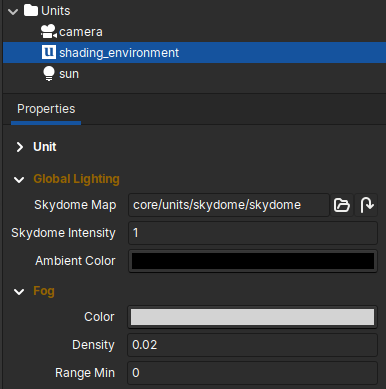
The Shading Environment unit with some of its components shown in the Inspector.
Custom Shading Environment
Every level must contain exactly one shading environment unit named
shading_environment. When you create a new level with the Level
Editor, Crown inserts a default shading environment unit for that level.
Because the shading environment is a Unit, you can edit its components in the Inspector and save the unit as a prefab for reuse in other levels.
Default components
Crown provides a set of components commonly attached to the shading environment. These components establish the scene base look and control post-processing effects.
Global Lighting
The Global Lighting component controls the Skydome and ambient light contribution:
Skydome Map: equirectangular projection texture used to render the skydomeSkydome Intensity: multiplier applied to the skydome texture to boost or soften its contributionAmbient Color: base color added to objects when direct lighting is absent
Fog
The Fog component simulates atmospheric scattering between the camera and shaded objects:
Color: fog base colorDensity: overall fog strength; higher values make distant objects appear foggierRange Min/Range Max: distances from the camera where fog starts and endsSun Blend: mixes the sun color into the fog (0 = no sun influence, 1 = fog color replaced by sun color)Enabled: toggle the fog simulation
Bloom
The Bloom component adds glow around very bright parts of the image.
Weight: blending weight of the bloom contribution (0 = no bloom contribution, 1 = image is replaced by bloom)Intensity: bloom brightnessEnabled: toggle the effect
Tonemap
The Tonemap component maps the renderer’s HDR output to the displayable color range of the monitor.
Gamma: no complex tonemapping, only gamma correctionReinhardFilmicACES