Introduction
This section explains what Units are, how they work, how they can be created, saved, used, extended etc.
Units
Units are the basic building block in Crown. A Unit represents a single logical object in the game world: a character, a light, a prop, and so on.
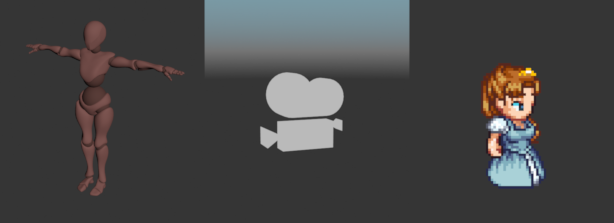
A unit imported from a scene, a camera unit, and a unit representing a sprite.
At the most fundamental level, Units are just numeric IDs that identify a specific object in a World. Units on their own are empty. You add Components to a Unit to give it behaviour and appearance.
Components
Contrary to some other engines, in Crown all Unit Components are optional, even the Transform Component can be omitted. This way you can have purely functional Units with no runtime cost.
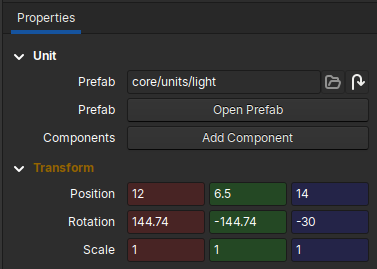
A “light” unit with its transform component displayed in the Inspector.
Units can have any number of components attached to them, but only one component per type is allowed.
Hierarchies
Units can be organised in parent/child hierarchies. This allows the creation of complex units from a number of simpler ones. To create a Unit with two lights, for example, you will create separate units each with their own Light Component, and then link the two together via a Transform Component.
Prefabs
A unit saved in the Project as .unit resource is called Prefab. Prefabs
are a powerful way to reuse units. Prefabs can store not just a single unit,
but entire hierarchies with all their components and properties.
A prefab inherits all units and components of its base prefab, if any. Inherited units and components in the derived prefab can be removed, overridden, or complemented with new units and components.
Modifications to a base prefab are automatically propagated to all derived prefabs.
The prebab system can be used to implement many popular patterns and techniques. The most common use for a prefab is to leverage its inheritance system to implement OOP-style behavior; you could have:
a base
enemyprefab that defines the common geometry, animations and scripts;derived prefabs such as
enemy_heavyandenemy_fastthat override only materials, health values or behaviour parameters.